Manual control
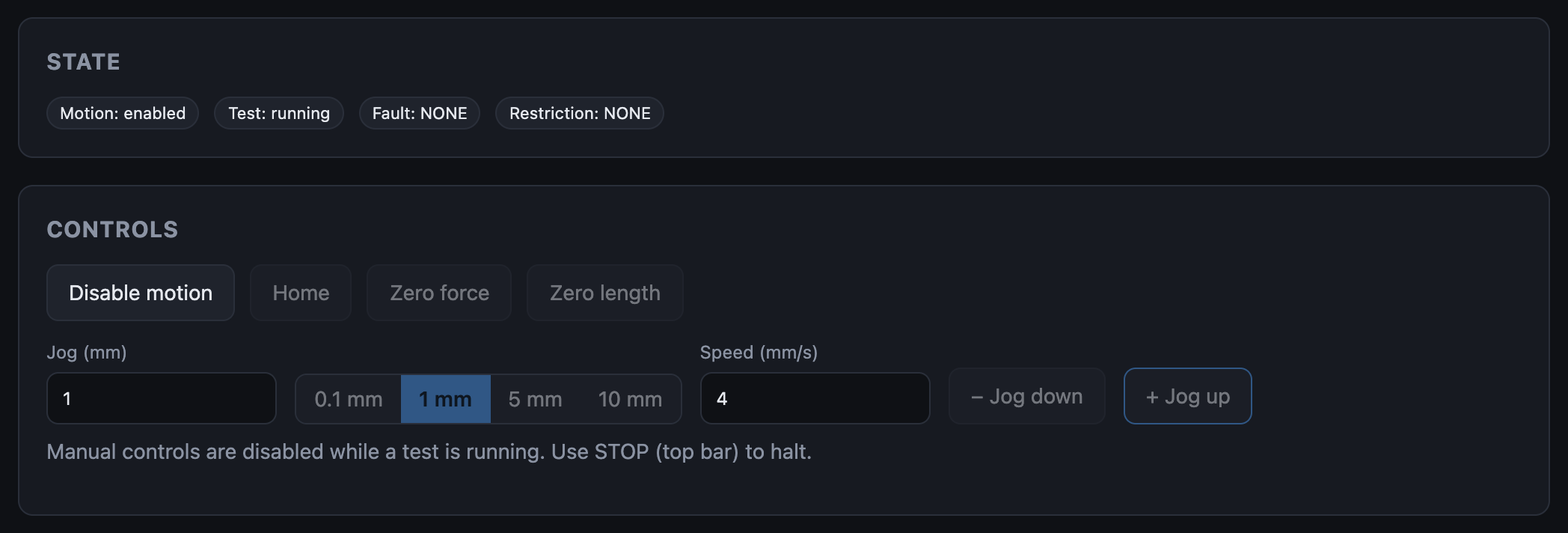
The Controls panel on the Control screen positions the carriage, homes the axis, and zeroes force and length before a test.

Enable motion
The machine starts with motion disabled. Click Enable motion; the Motion badge changes to enabled and the button becomes Disable motion.
Enabling motion permits movement. It does not move anything.
The button changes with the machine's state:
| Button | When |
|---|---|
| Enable motion | Motion is off and nothing is wrong |
| Disable motion | Motion is on, or a fault is showing (the machine refuses to enable while faulted, so the button offers the disable) |
| Clear stall (disable motion) | A SERVO_STALL fault is showing |
| Motion … (greyed out) | The machine has not reported its state yet |
If the button does nothing or a banner is showing, see The machine won't move.
When the controls are locked
Jog and Home are greyed out while motion is off, while the machine has not reported its state, while it is faulted, and while a test is running. Hover a locked button for the reason. Zero force and Zero length don't move the carriage, so they work with motion off; they lock only while the state is unknown or a test is running.
Jog
- Set Jog (mm): type a distance or pick 0.1 / 1 / 5 / 10 mm.
- Set Speed (mm/s).
- Click + Jog up or − Jog down.
A blank or zero distance or speed is refused with a message. If the machine turns a jog down, a toast says so:

Home, Zero force, Zero length
| Button | Action |
|---|---|
| Home | Homes the axis to its reference |
| Zero force | Makes the current load the origin of Sample Force |
| Zero length | Makes the current position the origin of Sample Position (the gauge length) |
Zeroing defines the sample coordinates a test records. Machine Force and Machine Position stay absolute.
During a test
Jog, home and zero are locked while a test is running. Disable motion and the status bar's STOP stay available: either one disables motion, which ends the test.
Clearing a servo stall
A stall means the carriage stopped following the drive. It stays set until you acknowledge it:
- Clear whatever is blocking the carriage.
- Click Clear stall (disable motion).
- Click Enable motion.
Faults → SERVO_STALL has the details.