The machine won't move
Motion needs every one of these to be true. Check them from the top; the first one that fails is your answer.
flowchart TD
    A{"Status bar:<br/>Connected + Responding?"} -- no --> A1["Connection problems"]
    A -- yes --> B{"Red banner under<br/>the status bar?"}
    B -- yes --> B1["Firmware problems"]
    B -- no --> C{"State badges show —?"}
    C -- yes --> C1["Wait for the machine's state"]
    C -- no --> D{"Fault: NONE?"}
    D -- no --> D1["Clear the fault"]
    D -- yes --> E{"Motion: enabled?"}
    E -- no --> E1["Click Enable motion"]
    E -- yes --> F{"Test: idle?"}
    F -- no --> F1["Manual controls are locked during a test"]
    F -- yes --> G{"Restriction: NONE?"}
    G -- no --> G1["Motion is allowed, but speed-limited"]
    G -- yes --> H["The command is accepted:<br/>check the drive"]
Not connected, or not responding
The Control screen says Connect a device to see live data, or the status bar says Not responding. See Connection problems.

A red banner is showing

The app refuses to move a machine whose firmware it can't talk to safely. Enable motion and jogs are refused in the app, before anything is sent. See Firmware problems.
The state badges show —

The machine hasn't reported its state yet, so the app doesn't know whether it is safe to offer controls. It unlocks when the first state report arrives, normally within a second or two of connecting.
If it stays like this, the firmware isn't answering state requests: treat it as Connected but not responding.
A fault is showing

The Fault badge and the status banner are red, Jog and Home are locked, and the button offers Disable motion, because the machine refuses to enable motion while faulted. The banner says what the fault is and what to do. Find it in Faults.
Motion is disabled

Fault: NONE, Motion: disabled, and the banner reads Motion is off.
This is how the machine starts, and where STOP leaves it. Jog and Home are
locked until motion is on. Click Enable motion.
If clicking it changes nothing, the machine turned the request down: a fault appeared at that moment (watch the Fault badge).
A test is running
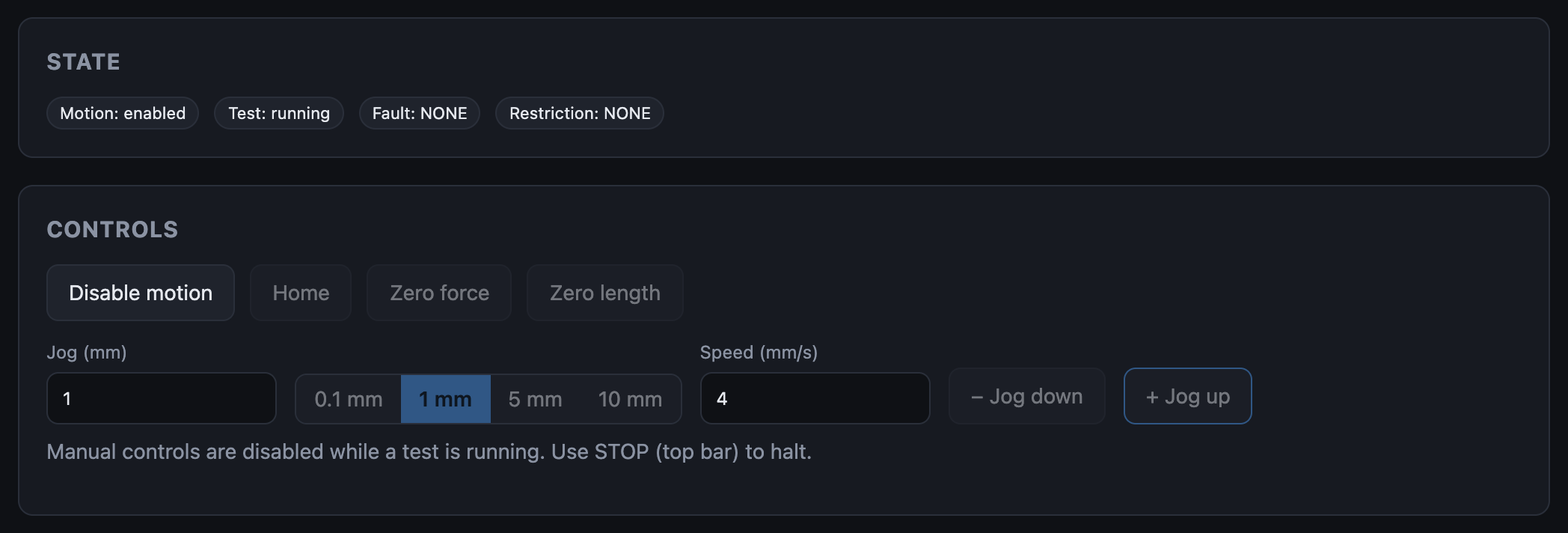
Jog, home and zero are locked while the machine runs a test. Wait for it to finish, or stop it with Disable motion or STOP.
If no test should be running, the last one may not have ended: disable motion to end it.
A restriction is showing

A restriction does not stop manual motion. It caps the speed at Restricted Velocity from the machine configuration, so the carriage can still be backed away slowly. If it seems not to move, your jog may simply be running at that low speed. See Restrictions.
Everything looks right, but the carriage doesn't move
Motion is enabled, no fault, no restriction, and the jog is accepted (no toast), yet nothing moves. The command reached the drive's step and direction inputs; the drive isn't acting on it.
| Check | Why |
|---|---|
| Drive enable in Machine configuration | With the wrong polarity the drive is held off whenever motion is enabled. Flip it, Write to device, Reboot now. |
| The drive has power | The emergency stop circuit switches the drive's supply. Follow the power-up sequence. |
| Step, direction and enable wiring | Run the drive and encoder check: The encoder did not count in either direction points here. |
| Wait a moment | If the drive really isn't moving the carriage, the machine raises SERVO_STALL once it has sent about 1 mm of pulses with no matching encoder travel. |
"Jog was rejected by the machine"

The app sent the jog and the machine refused it. Usually motion isn't enabled (a fault just appeared, or STOP was pressed), or the machine is busy with a test. Check the State badges.
"Enter a valid jog distance and a speed greater than 0"
The Jog (mm) or Speed (mm/s) field is blank or zero.